
IMPLEMENTATION PLAN
Website Structure
Our website is easily navigable from the home page, where you can access all areas of our website. The menu bar at the top of the website shows all available resources on the website.
This is the structure map for your convenience. Click on it to enlarge.
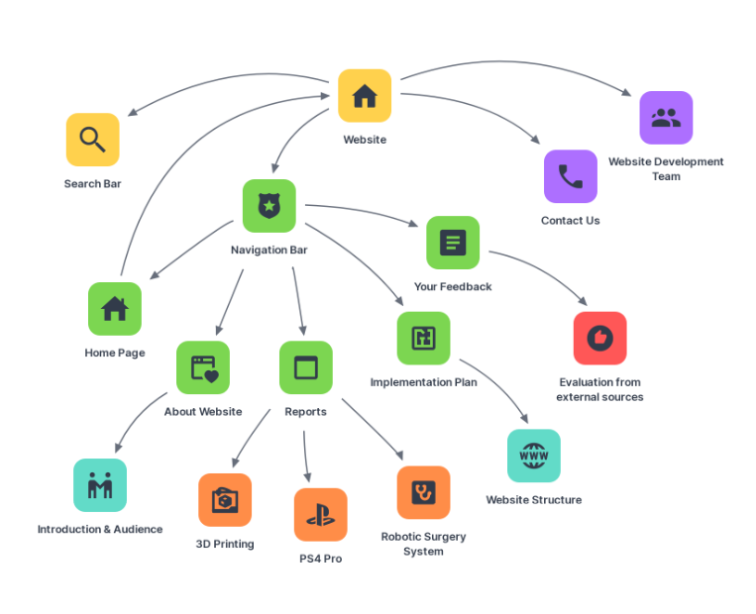
The home page acts as a main hub from where most pages can be accessed. It provides a snapshot of our most recent reports, a search bar for quicker navigation, an email contact form to address any urgent issues, as well as some basic information on the development team’s members.
Using the navigation bar, you can access the “About Website” section which contains an introduction to our website, providing the reasoning behind the project. Moreover, it outlines our target audience and covers their various needs in this field.
However, the core of this website is focused within the “Reports” tab. Three short reports on disruptive and emerging technologies are made available for reading, covering the following topics of interest:
- The PS4 PRO was reported on by Boris Zinchenko, detailing the intricacies of how a modern-day gaming console is created as well as the impacts this type of technology has on being able to create new friends and connections with people all over the world.
- Robotic surgical systems were reported on by Simon Daley, diving into the revolutionary invention in surgical robotics. He covers how this technology is innovative in terms of medical developments for the past years.
- 3D Printing was reported on by Angus Bava who, through his report not only investigated that this technology is the way of the future, but also that it also has the potential to facilitate a decrease in the demand for global transportation of goods.
At the end of each report, we have provided a comments form in case there is any feedback people want to give us on the reports themselves.
The final tab of the navigation bar represents the evaluation section which combines a summary of several user evaluations people have undertook in providing feedback on our website and further improvements.
Changing the Language
HTML – Structure
HTML or Hyper Text Markup Language, and forms the structural components in a webpage. While our WordPress theme already incorporates basic HTML, we have built upon this foundation with innovations of our own. We plan to scatter several images throughout each page so as to not overwhelm the reader with text, and provide context for the information being presented.
One example of this would be:
<!– wp:image {“id”:503,”align”:”right”,”width”:328,”height”:213} –>
<div class=”wp-block-image”><figure class=”alignright is-resized”><img src=”/wp-content/uploads/2020/06/boomerstechnology.png” alt=”” class=”wp-image-503″ width=”328″ height=”213″/></figure></div>
<!– /wp:image –>
Through the use of HTML, we have determined the position of the image to align with the text on the right side as well as have the size fit perfectly within the text. The original image is uploaded to WordPress and the HTML code sources said image from the appropriate documents.
Another showcase of HTML would be our website’s content – reports and information about the website and its developers. Every header/title used is coded using <h>…</h> and paragraphs are created using <p>…</p>. These basic examples can be combined with, for example:
<p><strong>Feedback from first evaluator: Suzanne</strong></p>
This text is bolded to make it stand out and catch the reader’s attention.
Javascript – Behaviour
Javascript, commonly abbreviated as JS, can be built upon HTML to offer users interactivity with a website or program. Using JS, we have a lot more freedom to implement our desired features in the website and allow consumers to manipulate it to suit their individual needs. On the main reports page, we plan to implement a “show more/show less” button. Viewers will be able to read a snippet of information to gauge whether it appeals to them and press show more to reveal even more information. If they have deemed the information worth their time, they can press the “continue reading button” for the full article. The following is an example of this code:
<!– wp:html –>
<style>#more {display: none;}</style><p>Surgical robotics are an emerging technology, heralded as being revolutionary in the field of medicine. The first of its kind to be approved for use in surgery (in the year 2000) is named the da Vinci system, created by American company Intuitive Surgical<span id=”dots”>…</span><span id=”more”>. The da Vinci robot has a surgeon sitting at a console and controlling three or four manoeuvrable arms to manipulate tissue in the human body and additional assisting doctors monitor the system’s diagnostics. It was created not only to improve success rates of surgery but also the ability to remotely control a surgical robot, which has applications in areas such as space and Antarctic exploration.</span></p><button onclick=”myFunction()” id=”myBtn”>Read more</button><script>
function myFunction() {
var dots = document.getElementById(“dots”);
var moreText = document.getElementById(“more”);
var btnText = document.getElementById(“myBtn”);
if (dots.style.display === “none”) {
dots.style.display = “inline”;
btnText.innerHTML = “Read more”;
moreText.style.display = “none”;
} else {
dots.style.display = “none”;
btnText.innerHTML = “Read less”;
moreText.style.display = “inline”;
}
}
</script></p>
<!– /wp:html –>
As you can see, our use of JS builds upon the basic HTML structure – <p>…</p>, by assigning the latter half of the paragraph to a variable and manipulating it using JS to “display: none”. After coding a button to reveal this text using an IF statement, readers are given the option to display more text if their interest is piqued.
Another example of JS is:
<p><a href=”/wp-content/uploads/2020/06/sitemap.png” target=”_blank” rel=”noopener noreferrer”><br><img class=”” style=”width: 444px;” src=”/wp-content/uploads/2020/06/sitemap.png” alt=”Site Map” height=”370″></a></p>
Here, an image is connected to a hyperlink which takes the reader to an enlarged version of the image to be viewed in greater detail.
CSS – Style
Lastly, CSS, or cascading style sheets, change how HTML elements are displayed to the viewer. This is done to make websites more aesthetically pleasing in an attempt to hold the consumer’s attention. WordPress’s theme provides us with a template where inline CSS can be edited. We plan to add CSS to the buttons on the main reports page. The following is an example of this:
button {
background-color: #008000;
border: none;
color: white;
padding: 5px 25px;
text-align: center;
text-decoration: none;
display: inline-block;
font-size: 16px;
}
The background colour, size, and position of the button were all changed to stand out against the white background and give the page a more modernised look. When hovering over these buttons, they change colour which indicates to viewers that they are interactable
Another example used is:
img {
border: 1px solid #ddd;
border-radius: 4px;
padding: 5px;
width: 330px;
}
img:hover {
box-shadow: 0 0 2px 1px rgba(0, 140, 186, 0.5);
}
Using this, we can create a border around an image to visually show how it is interactable. Without this effect, many viewers may miss this function. Unfortunately, we were not able to make the child theme work. This is why only external CSS has been implemented.
References
Anjali Tomar 2017, The Difference Between HTML, CSS and JavaScript, Web Development Institute, Retrieved 31 June 2020, http://www.web-development-institute.com/the-difference-between-html-css-and-javascript
W3schools 2020, How TO – Thumbnail, Norway w3schools, Retrieved 4 June 2020, https://www.w3schools.com/howto/howto_css_thumbnail.asp
W3schools 2020, HTML Examples, Norway w3schools, Retrieved 1 June 2020, https://www.w3schools.com/html/html_examples.asp